
Dated archives stop working once a PLC project lives for years or passes through several hands. This guide explains why Git does not work directly on a TIA Portal project, how the VCI interface has solved the problem since V16, which workflow to adopt alone or as a team, and how T-IA Connect can help with its own alternative, VCS.
The folder every PLC engineer knows
Open the file server of almost any automation engineering office and you will find the same thing:
- Project_final.zap
- Project_final_v2.zap
- Project_final_v2_OK.zap
- Project_final_v2_OK_really.zap
This is not carelessness. It is the only method that works without a tool: archive the project, add a date or a suffix, and hope you never have to answer the question "what changed between the version that ran and the one that does not?".
Software developers solved this problem about twenty years ago with Git. The good news is that TIA Portal can now work with Git. The bad news is that dropping your project into a repository is not enough.
Why you cannot put a TIA Portal project straight into Git
Git was designed for text. It compares files line by line, shows what was added or removed, and merges the work of two people when they did not touch the same lines.
A TIA Portal project is a set of binary files. You can technically place it in a Git repository, but you gain almost nothing:
- Git sees that the file changed, without being able to say what.
- Two changes made in parallel cannot be merged: you have to pick one.
- The repository grows with every save, because each version is stored almost in full.
In other words, you end up with a dated archive that is more complicated than the one you had.
What you actually need
Before talking about tools, state the need. In a PLC project, version control should let you:
- know exactly what changed between two versions, block by block;
- know who made the change, when, and why;
- go back to a previous version without overwriting everything else;
- work as a team on the same project without stepping on each other.
To get there, the program has to exist in a form Git can read: files, one per object.
The solution Siemens provides: the VCI interface
Since TIA Portal V16, Siemens has provided a Version Control Interface, or VCI. The principle is simple.
You create a workspace: an ordinary folder on your disk, linked to the project. You export the objects of your program into it. Each block, each PLC tag table, each data type becomes a file, mostly in XML format. That folder can be a Git repository.
The VCI editor then shows two columns: the project on one side, the workspace on the other. For each object it tells you whether the two are identical or whether one is newer, and it lets you synchronize in either direction.
Git, for its part, only sees text files. It can therefore do its job: compare, keep history, merge.
The workflow, step by step
1. Create the workspace. In the project tree, open the "Version Control Interface" entry, add a workspace and link it to an empty folder.
2. Initialize the repository. In that folder, with your usual Git client or from the command line:
cd C:\Projects\Machine_12\workspace
git init
3. Export the objects. In the VCI editor, drag your blocks, PLC tag tables and data types from the project to the workspace. The files appear in the folder.
4. Record the first version.
git add .
git commit -m "Initial version after commissioning"
5. Day to day. You make changes in TIA Portal, synchronize the modified objects to the workspace, then commit to Git with a message that says what you did.
6. To go back. Restore the older version of the files in Git, then synchronize from the workspace to the project. Remember to recompile afterwards.
Limits you should know about
This method does not replace everything. Better to know before committing to it.
- Not the whole project is covered. The VCI handles the program: blocks, PLC tag tables, data types. Hardware configuration and HMI screens do not follow the same path. Check what your version supports.
- XML is not meant to be read. A difference in an SCL block stays understandable. In a Ladder block, it takes some practice.
- It requires discipline. The project and the workspace are two separate things. If you forget to synchronize before committing, your repository no longer reflects reality.
For these reasons, keep a full archive of the project at every milestone: factory acceptance test, commissioning, delivery. Git keeps the history of the program, the archive guarantees you can reopen everything.
Three rules that change everything for a team
One commit, one explained change. "Added interlock on door 3" is useful two years from now. "Changes" is not.
One marker per delivered machine. Add a Git tag for every version installed at a customer site. The day they call, you know exactly what is running there.
A full archive at every milestone. Git and the archive are not rivals, they complement each other.
The alternative: T-IA Connect VCS
The VCI interface does the job, but it leaves a lot of manual steps: export, synchronize, remember to commit. That is exactly what we wanted to remove in T-IA Connect, with a feature we call VCS, for Version Control System.
The principle stays the same: Git, and readable files. What changes is everything around it.
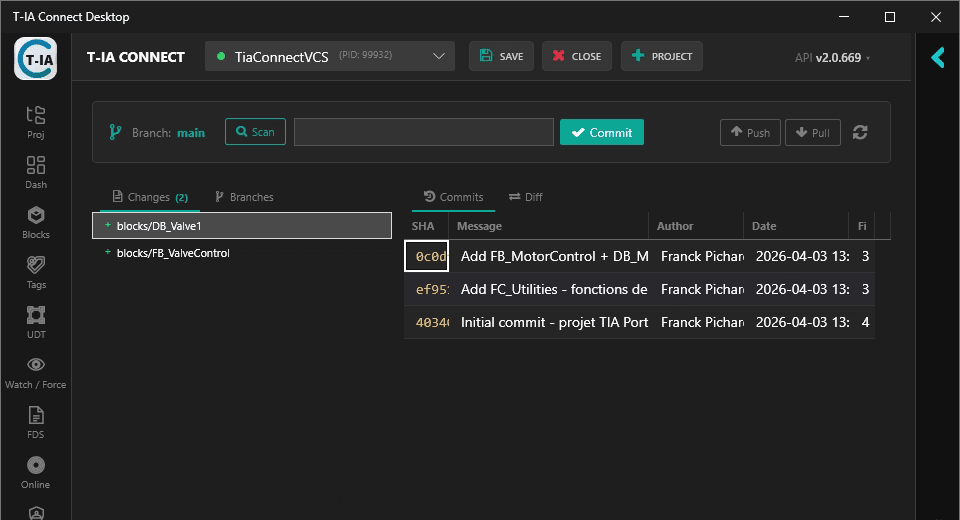
- Export is automatic. T-IA Connect exports the project to the repository itself, and only what has changed.
- It covers more than the program. On top of blocks, PLC tag tables and data types, it keeps the history of watch tables and of the hardware configuration of each device.
- Diffs are clean. XML files are normalized before they are committed: timestamps and generated identifiers, which change on every export even when nothing moved, are removed. A block you did not touch does not show up as modified.
- A restore point before every sensitive operation. T-IA Connect can automatically record the state of the project before a compilation and before a download to the PLC. If something goes wrong, the previous version exists.
- All of Git is there. History, diff, branches, merge, restore, and synchronization with a remote server such as GitLab, GitHub or Gitea.
Above all, it can be driven in three ways: from the T-IA Connect interface, through its REST API, or by asking an AI assistant. "Show me what changed in the conveyor block since commissioning" becomes a question you actually get an answer to. The assistant proposes, you approve: operations that modify the project or the repository require your consent.
One caveat: restore applies to the program, meaning data types, PLC tag tables and blocks. The hardware configuration is kept in history so you can compare it, not to be re-imported automatically. The rule of a full archive at every milestone therefore still holds.
In short
- A TIA Portal project placed as is in Git brings almost nothing.
- The VCI interface, available since V16, exports the program as files Git can compare.
- The workflow takes six steps and requires no exotic tooling.
- It does not cover the whole project: keep a full archive at every milestone.
- T-IA Connect automates this workflow with its VCS feature and extends it to the hardware configuration.
How do you version your projects today? Let me know in the comments.